影像是什么
从真实世界中获取数字影像有很多方法,比如数码相机、扫描仪、CT或者磁共振成像。无论哪种方法,我们(人类)看到的是影像,而让数字设备来“看“的时候,则是在记录影像中的每一个点的数值。 [1]
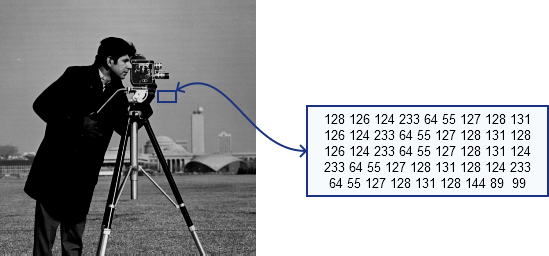
比如上面的影像,在标出的蓝框中你见到的只是一块灰色区域,但是计算机中识别为一个矩阵,该矩阵包含了所有像素点的强度值。如何获取并存储这些像素值由我们的需求而定,最终在计算机世界里所有影像都可以简化矩阵信息。当然,影像还有其他信息,下面我们即将介绍。
影像元数据
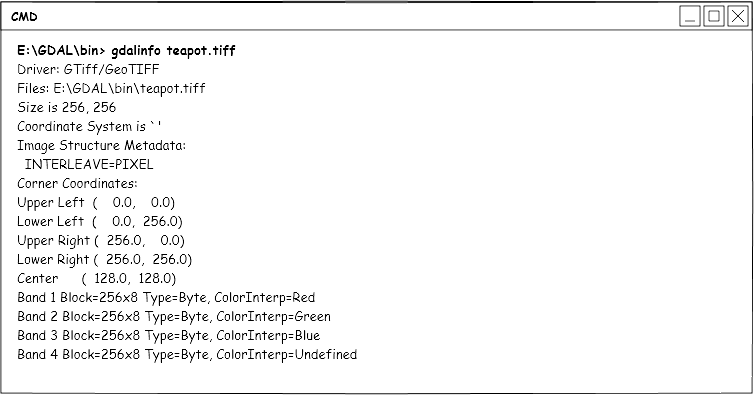
影像元数据是指影像中除了信息矩阵以外的一些参考数据。例如影像的长、宽、波段数、数据类型、存储方式、投影坐标、太阳高度角、获取时间、传感器信息等内容。使用 gdalinfo文件信息工具 ,我们就可以看到影像的元数据信息:
GDAL中的影像
GDAL中,影像也可以称为 数据集 ,大致分为两种类型,多波段影像和多数据集影像。 GDAL数据模型 中我们将详细介绍GDAL对影像数据如何解析和读写,这章中,我们只简单的分析一下两种数据的共性和区别。
多波段数据
多波段数据是我们比较熟悉的,例如tiff格式、jpg格式、png格式、img格式等,都是多个波段的数据。我们一般处理的也都是多波段的数据。
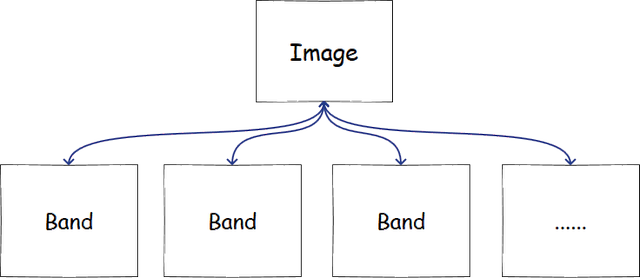
多波段的数据实际上可以看为一个二维的数组,在GDAL中就是包含了多个 波段 的一个 数据集 ,里面保存了影像的所有数据以及元数据。其中数据存在 波段 中,每个波段可以当作一维数组进行处理。如下图所示:
多数据集数据
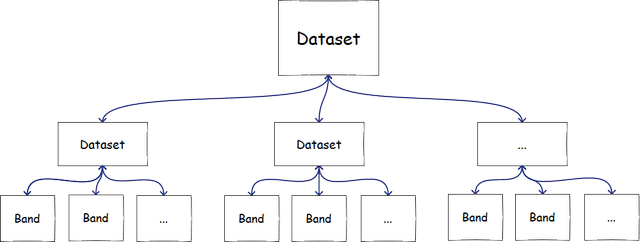
这种数据遥感影像中也比较常见,例如hdf格式、he5格式、netcdf格式等。这些数据在GDAL中,与上文介绍的多波段数据不同,是包含了多个 数据集 的 数据集 。可以简单的理解为:一个多数据集数据包含了多个 多波段数据 ,当然,实际上,这些 多波段数据 里大部分只有一个波段。如下图所示:
一般我们会将多数据集数据转化为多波段的数据,方便处理。下面就是一个多数据集数据转换为多波段数据的函数,其中的部分内容我们将在后文中陆续展开讲解:
/**
  GDALAllRegister,仅此一次
*/
void RegisterAll()
{
  if(GDALGetDriverByName("GTiff") == NULL) {
    GDALAllRegister();
  }
}

/**
所有subset转成一个tif
  @param fileName    输入文件名
  @param outfile     输出文件名
  @param pBandIndex  所需输出的数据集,用数组表示,从1开始,例如[1,3,5],传入NULL表示全部数据集
  @param pBandCount  所需输出数据集个数,如果pBandIndex设置为NULL,此参数无作用
  @return
 */
void subsets2tif(const char *fileName, const char *outfile, \
                 int *pBandIndex, int pBandCount)
{
  int i, j;
  char *outFileName = NULL; //输出文件名

  if(outfile == NULL) {
    int charNum = strlen(fileName);
    charNum += 5;
    outFileName = new char[charNum];
    strcpy(outFileName, fileName);
    strcat(outFileName, ".tif") ;
  } else {
    int charNum = strlen(outfile);
    outFileName = new char[charNum + 1];
    strcpy(outFileName, outfile);
  }

  RegisterAll();//注册类型,打开影像必须加入此句
  GDALDataset *pDataSet = (GDALDataset *) GDALOpen(fileName, GA_ReadOnly);

  if(pDataSet == NULL) {
    printf("不能打开该文件,请检查文件是否存在!");
    return ;
  }

  //获取子数据集
  char **papszSUBDATASETS = pDataSet->GetMetadata("SUBDATASETS");
  int subdsNumber =  papszSUBDATASETS == NULL ? 1 : CSLCount(papszSUBDATASETS) / 2;
  char **vSubDataSets = new char*[subdsNumber]; //子数据集名称列表
  char **vSubDataDesc = new char*[subdsNumber]; //子数据集描述列表
  char *papszMetadata = NULL;

  //如果没有子数据集,则其本身就是一个数据集
  if(papszSUBDATASETS == NULL) {
    const char *Metadata = GDALGetDriverShortName((GDALDriverH)pDataSet);
    vSubDataSets[0] = new char[strlen(Metadata) + 1];
    vSubDataDesc[0] = new char[strlen(Metadata) + 1];
    strcpy(vSubDataSets[0], Metadata);
    strcpy(vSubDataDesc[0], Metadata);
  } else {
    int iCount = CSLCount(papszSUBDATASETS);  //计算子数据集的个数

    if(iCount <= 0) {   //没有子数据集,则返回
      GDALClose((GDALDriverH)pDataSet);
      return;
    }

    //将子数据集压入列表
    for(i = 0, j = 0; papszSUBDATASETS[i] != NULL; i++) {
      if(i % 2 != 0) {
        continue;
      }

      char *setInfo = papszSUBDATASETS[i];
      setInfo = strstr(setInfo, "=");

      if(setInfo[0] == '=') {
        memmove(setInfo, setInfo + 1, strlen(setInfo)); //提取元数据中子数据集名称
        vSubDataSets[j] = new char[strlen(setInfo) + 1];
        strcpy(vSubDataSets[j], setInfo);
      }

      char *descptn = papszSUBDATASETS[i + 1];
      descptn = strstr(descptn, "=");

      if(descptn[0] == '=') {
        memmove(descptn, descptn + 1, strlen(descptn)); //提取元数据中子数据集描述
        vSubDataDesc[j] = new char[strlen(descptn) + 1];
        strcpy(vSubDataDesc[j], descptn);
      }

      j++;
    }//end for
  }

  int Width, Height;
  GDALDriver *poDriver;
  const char *pszFormat = "GTiff";
  poDriver = GetGDALDriverManager()->GetDriverByName(pszFormat);

  if(poDriver == NULL) {
    return;
  }

  //将每个子数据集转为对应的tif假设所有数据集大小相同
  bool init = false;
  int iBands = pBandIndex != NULL ? pBandCount : subdsNumber;
  int realBandCount = 0;

  for(i = 0; i < subdsNumber; i++) {
    if(pBandIndex != NULL) {
      bool runNext = true;

      for(j = 0; j < pBandCount; j++) {
        if(pBandIndex[j] == (i + 1)) {
          realBandCount = j + 1;
          runNext = false;
          break;
        }
      }

      if(runNext) {
        continue;
      }
    } else {
      realBandCount = i + 1;
    }

    char *dsName = vSubDataSets[i];
    GDALDataset *subDs = (GDALDataset *) GDALOpen(dsName, GA_ReadOnly);

    if(subDs == NULL) {
      continue;
    }

    Width = subDs->GetRasterXSize();
    Height = subDs->GetRasterYSize();
    void *subData;
    GDALRasterBand *poBand = subDs->GetRasterBand(1);
    GDALDataType eBufType = poBand->GetRasterDataType();

    switch(eBufType) {
      case GDT_Byte:
        subData = new char[Width * Height];
        break;

      case GDT_Int16:
        subData = new short[Width * Height];
        break;

      case GDT_Int32:
        subData = new int[Width * Height];
        break;

      case GDT_Float32:
        subData = new float[Width * Height];
        break;

      case GDT_Float64:
        subData = new double[Width * Height];
        break;

      default:
        subData = new double[Width * Height];
        break;
    }

    poBand->RasterIO(GF_Read, 0, 0, Width, Height, subData,\
                     Width, Height, eBufType, 0, 0);
    //写入影像
    GDALDataset *pDstDs = NULL;

    if(!init) { //创建影像
      char **papszOptions = NULL;
      //设置bsq或者 BIP bsq:BAND,bip:PIXEL
      papszOptions = CSLSetNameValue(papszOptions, "INTERLEAVE", "BAND");
      pDstDs = poDriver->Create(outFileName, Width, Height, \
                                iBands, eBufType, papszOptions);
      double geos[6];
      subDs->GetGeoTransform(geos);//变换参数
      char *pszProjection = NULL;
      char *pszPrettyWkt = NULL;
      //获取ds1坐标
      OGRSpatialReferenceH  hSRS;

      if(GDALGetProjectionRef(subDs) != NULL) {
        pszProjection = (char *) GDALGetProjectionRef(subDs);
        hSRS = OSRNewSpatialReference(NULL);

        if(OSRImportFromWkt(hSRS, &pszProjection) == CE_None) {
          OSRExportToPrettyWkt(hSRS, &pszPrettyWkt, FALSE);
          pDstDs->SetProjection(pszPrettyWkt);
        }
      }

      //设置坐标
      pDstDs->SetGeoTransform(geos);
      CPLFree(pszPrettyWkt);
      pDstDs->SetMetadata(subDs->GetMetadata());
      pDstDs->FlushCache();
      init = true;
    } else {
      //打开影像
      pDstDs = (GDALDataset *) GDALOpen(outFileName, GA_Update);
    }

    GDALRasterBand *poBandOut;
    poBandOut = pDstDs->GetRasterBand(realBandCount);
    poBandOut->SetScale(poBand->GetScale());
    poBandOut->SetOffset(poBand->GetOffset());
    poBandOut->SetUnitType(poBand->GetUnitType());
    poBandOut->SetColorInterpretation(poBand->GetColorInterpretation());
    poBandOut->SetDescription(poBand->GetDescription());
    poBandOut->SetNoDataValue(poBand->GetNoDataValue());
    //GDT_Float32和 **OutputImg 类型要对应!
    poBandOut->RasterIO(GF_Write, 0, 0, Width, Height, \
                        subData, Width, Height, eBufType, 0, 0);
    pDstDs->FlushCache();
    //关闭
    GDALClose(subDs);
    GDALClose(pDstDs);
    delete[] subData;
  }

  GDALClose(pDataSet);

  if(papszMetadata) {
    delete papszMetadata;
  }

  for(i = 0; i < subdsNumber; i++) {
    delete[] vSubDataDesc[i];
    delete[] vSubDataSets[i];
  }

  delete[] vSubDataDesc;
  vSubDataDesc = NULL;
  delete[] vSubDataSets;
  vSubDataSets = NULL;
  delete[] outFileName;
}